
Is your Gourmia Air Fryer GAF1220 refusing to power on? It can be frustrating when your appliance suddenly stops working, especially when you’re craving those perfectly crispy air-fried delights. This guide will walk you through a systematic approach to diagnosing and potentially fixing the issue, saving you the cost of immediate replacement. We’ll cover common causes, troubleshooting steps, and helpful tips to get your Gourmia air fryer back in action.
This article matters because it addresses a common problem faced by many Gourmia Air Fryer GAF1220 users. We’ll provide a clear, step-by-step guide to help you troubleshoot the issue and potentially resolve it yourself. From checking the power supply to resetting the unit, we’ll cover all the essential troubleshooting steps. By following these instructions, you can save time, money, and the hassle of replacing your air fryer.
1. Check the Power Supply
The first and most basic step is to verify that your Gourmia Air Fryer GAF1220 is receiving power.
- Outlet Check: Ensure the air fryer is plugged into a working electrical outlet. Test the outlet with another device to confirm it’s providing power.
- Cord Inspection: Examine the power cord for any visible damage, such as cuts, frayed wires, or exposed conductors. A damaged cord can prevent the air fryer from turning on and can be a safety hazard. If you notice any damage, do not use the air fryer and replace the power cord.
- Power Surge: Check if the outlet is affected by a power surge. Try plugging the air fryer into a different outlet on a different circuit to rule out any localized power issues.
2. Verify Basket Insertion and Safety Lock
Most air fryers, including the Gourmia GAF1220, have a safety mechanism that prevents them from turning on unless the basket is correctly inserted.
- Proper Placement: Ensure the air fryer basket is fully and correctly inserted into the unit.
- Safety Lock Engagement: Check if the safety lock or switch is properly engaged. This mechanism is designed to prevent the air fryer from operating if the basket is not securely in place. Try removing and re-inserting the basket to ensure the lock clicks into position.
- Sensor Obstruction: Inspect the area around the basket sensor for any obstructions or debris that might prevent the air fryer from detecting the basket. Clean the sensor area gently with a soft, dry cloth.
3. Reset the Air Fryer
Sometimes, a simple reset can resolve electronic glitches that prevent the Gourmia GAF1220 from turning on.
- Unplug and Wait: Unplug the air fryer from the power outlet and wait for 5-10 minutes. This allows the internal components to discharge any residual electricity.
- Reconnect and Test: Plug the air fryer back into the outlet and try turning it on. This reset process can sometimes clear temporary software or hardware issues.
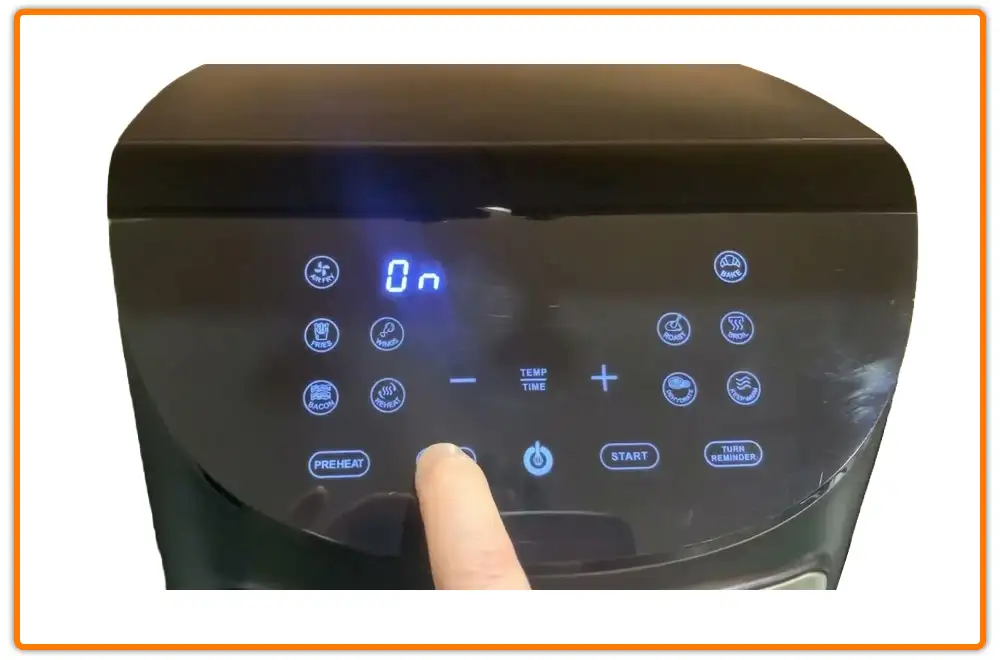
4. Check the Control Panel and Display
A malfunctioning control panel or display can also prevent the air fryer from starting.
- Button Functionality: Press each button on the control panel to ensure they are functioning correctly. Sometimes, buttons can become stuck or unresponsive due to spills or debris.
- Display Issues: Check if the display is lit or showing any error messages. If the display is not working, it could indicate a problem with the control panel or the unit’s internal electronics.
- Clean the Panel: Use a soft, damp cloth to clean the control panel, ensuring no moisture enters the unit.
5. Overheat Protection
Air fryers often have an overheat protection feature that automatically shuts off the appliance if it gets too hot.
- Cool Down Period: If the air fryer recently overheated, allow it to cool down completely for at least 30 minutes.
- Ventilation Check: Ensure that the air fryer has adequate ventilation around it. Do not place it near walls or other objects that could block airflow.
- Resetting Overheat Protection: Some air fryers may require a manual reset of the overheat protection. Check the user manual for specific instructions on how to do this, as it varies by model.
6. Inspect Internal Components (Advanced)
Warning: This step involves opening the air fryer, which can be dangerous and may void your warranty. Proceed with caution and only if you are comfortable with basic electronics repair.
- Unplug the Air Fryer: Always unplug the air fryer before attempting to inspect any internal components.
- Check the Fuse: Locate the fuse inside the air fryer and inspect it for any signs of damage or burnout. Replace the fuse with one of the same rating if necessary.
- Wiring Inspection: Check the internal wiring for any loose connections or damaged wires. Secure any loose connections and repair or replace any damaged wires.
- Component Failure: Look for any signs of component failure, such as burnt or swollen capacitors. If you notice any damaged components, it may be necessary to replace the entire unit or seek professional repair.
7. Contact Customer Support or Seek Professional Repair
If you’ve exhausted all the troubleshooting steps and your Gourmia Air Fryer GAF1220 still won’t turn on, it may be time to contact customer support or seek professional repair.
- Gourmia Customer Support: Contact Gourmia customer support for assistance. They may be able to provide additional troubleshooting steps or offer warranty service if your air fryer is still under warranty.
- Professional Repair: Consider taking your air fryer to a qualified appliance repair technician. They have the expertise and tools to diagnose and repair more complex issues.
FAQ
What do I do if my Gourmia air fryer shows an error code?
Refer to your Gourmia Air Fryer GAF1220 user manual for a list of error codes and their meanings. Each error code corresponds to a specific issue, such as overheating, sensor malfunction, or power supply problems. Follow the recommended troubleshooting steps for the specific error code displayed.
How do I clean my Gourmia air fryer to prevent future issues?
Regular cleaning is essential to maintain your Gourmia air fryer and prevent issues. After each use, allow the air fryer to cool down, then remove the basket and clean it with warm, soapy water. Wipe down the interior of the air fryer with a damp cloth. Avoid using abrasive cleaners or scouring pads, which can damage the non-stick coating.
What is the lifespan of a Gourmia air fryer?
The lifespan of a Gourmia air fryer depends on usage frequency and maintenance. On average, an air fryer can last between 1 to 5 years. Regular cleaning, proper usage, and avoiding overheating can extend the lifespan of your air fryer.
Can I use an extension cord with my Gourmia air fryer?
It’s generally not recommended to use an extension cord with your Gourmia air fryer. Air fryers require a significant amount of power, and using an extension cord can cause voltage drops or overheating, which can damage the air fryer or create a fire hazard. If you must use an extension cord, ensure it is a heavy-duty cord rated for the air fryer’s wattage.
Tips, Warnings, and Best Practices
- Avoid Overloading: Do not overload the air fryer basket, as this can affect cooking performance and potentially damage the unit.
- Proper Ventilation: Ensure the air fryer has adequate ventilation around it to prevent overheating.
- Regular Cleaning: Clean the air fryer regularly to prevent food buildup and maintain optimal performance.
- Power Surges: Use a surge protector to protect your air fryer from power surges.
- Damaged Cord: Never use the air fryer if the power cord is damaged.
Conclusion
Troubleshooting a Gourmia Air Fryer GAF1220 that won’t turn on involves a systematic approach, starting with basic checks and progressing to more advanced diagnostics. By checking the power supply, basket insertion, control panel, and internal components, you can often identify and resolve the issue. Remember to prioritize safety and consult the user manual or seek professional help when needed.
By following this guide, you can increase the chances of getting your Gourmia air fryer back in working order and continue enjoying your favorite air-fried recipes. If all else fails, consider reaching out to Gourmia customer support for further assistance or exploring professional repair options.