
The Cosori air fryer oven is a versatile kitchen appliance that can air fry, bake, roast, and more. If you’re new to using a Cosori air fryer oven, this guide will provide you with step-by-step instructions, tips, and troubleshooting advice to help you get the most out of your appliance.
Introduction
Air fryer ovens have become increasingly popular due to their ability to cook food quickly and with less oil than traditional cooking methods. The Cosori air fryer oven is a multifunctional appliance that offers a range of cooking options, making it a valuable addition to any kitchen. Whether you’re looking to air fry crispy fries, bake a pizza, or roast a chicken, this guide will help you navigate the features and functions of your Cosori air fryer oven.
Getting Started with Your Cosori Air Fryer Oven
Unboxing and Initial Setup
- Remove all packaging: Take out all packaging materials from around and inside the oven.
- Placement: Position the air fryer oven on a stable, level, and heat-resistant surface, ensuring it’s away from items that could be damaged by heat.
- Wash accessories: Clean all included accessories and the oven’s interior. Ensure everything is dry before placing the accessories back inside.
- Test Run: It is recommended to perform a test run to familiarize yourself with the appliance and eliminate any potential manufacturing residue. To do this, set the oven to “Toast” at the highest darkness level and let it run for a specified duration.
Understanding the Control Panel
Familiarize yourself with the control panel, which typically includes:
- Power Button: Turns the oven on and off.
- Function Knob: Selects cooking functions like Air Fry, Bake, Roast, Toast, etc.
- Time/Temp Knob: Adjusts cooking time and temperature.
- Start/Pause Button: Begins or pauses the cooking process.
- Light/Unit Button: Toggles the interior light and switches between Fahrenheit and Celsius.
- Fan Button: Controls the convection fan (for models with this feature).
Cooking with Your Cosori Air Fryer Oven
Step-by-Step Cooking Guide
- Select a cooking function: Turn the Function Knob to choose the desired cooking mode. The selected function will blink on the display.
- Adjust time and temperature: Use the Time/Temp Knob to set the cooking time and temperature according to your recipe.
- Preheat (optional): For best results, preheat the oven before adding food. Press the Preheat button, then press Start/Pause. The oven will beep when preheating is complete.
- Add food: Place food in the appropriate accessory (fry basket, food tray, wire rack, etc.) and insert it into the oven.
- Start cooking: Close the oven door and press the Start/Pause button to begin cooking.
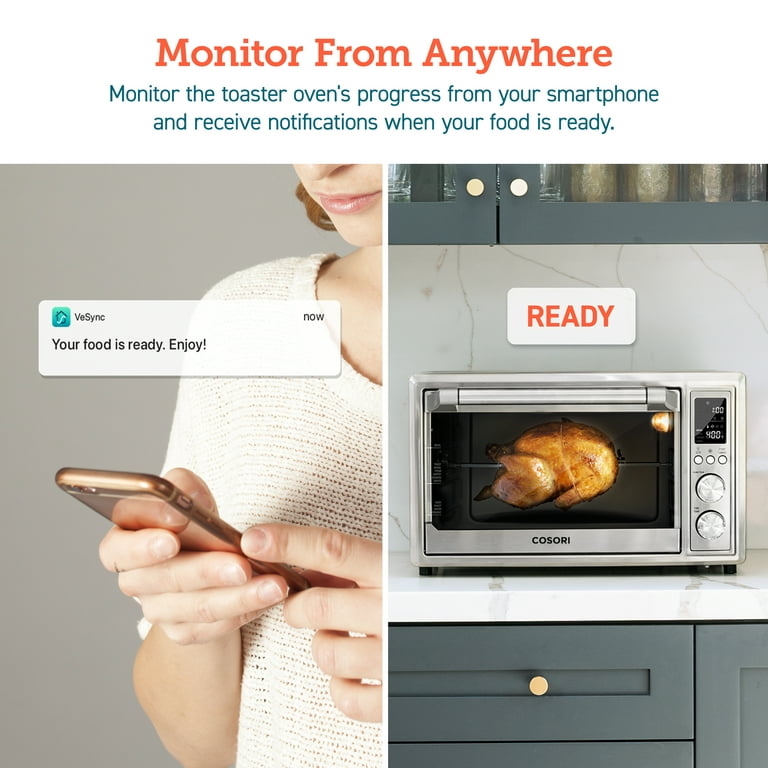
- Monitor progress: Keep an eye on your food through the viewing window. Some models have an interior light that automatically turns on during the last minute of cooking.
- Shake or flip (if needed): For even cooking, shake or flip food halfway through the cooking time. The oven may have a shake reminder function.
- End of cooking: The oven will beep when the cooking time is complete. Carefully remove the food and let it cool slightly before serving.
Cooking Functions Overview
Cosori air fryer ovens typically offer a variety of cooking functions:
- Air Fry: For crispy fries, chicken wings, and other fried favorites with less oil.
- Bake: For cakes, cookies, and other baked goods.
- Roast: For roasting meats, vegetables, and more.
- Toast: For toasting bread, bagels, and pastries.
- Broil: For browning and crisping the tops of dishes.
- Pizza: For cooking pizzas with a crispy crust.
- Dehydrate: For drying fruits, vegetables, and herbs.
- Warm: To keep cooked food warm.
Tips for Best Results
- Cut food into even sizes: This ensures uniform cooking.
- Don’t overcrowd the basket: Cook in batches if necessary to allow for proper air circulation.
- Use a small amount of oil: Toss food with a little oil for extra crispiness (except for greasy foods like bacon).
- Check for doneness: Use a meat thermometer to ensure meats are cooked to a safe internal temperature.
- Clean regularly: Clean the air fryer oven after each use to prevent buildup and ensure optimal performance.
Troubleshooting Your Cosori Air Fryer Oven
Common Problems and Solutions
- Air fryer not turning on:
- Ensure the air fryer is properly plugged into a working outlet.
- Check if the basket and tray are correctly placed.
- If the issue persists, contact Cosori customer service.
- Food sticking to the basket:
- Preheat the air fryer before adding food.
- Lightly spray the basket with cooking oil.
- Uneven cooking:
- Avoid overcrowding the basket.
- Shake or flip food halfway through cooking.
- Smoke coming from the air fryer:
- Clean the air fryer regularly to remove grease and oil buildup.
- When cooking fatty foods, add a little water to the bottom of the basket.
- Touch screen not responding:
- Wipe down the touch screen to remove any grease or food particles.
- Try unplugging the air fryer for a few minutes and then plugging it back in.
Practical Tips and Warnings
- Safety First: Always use heat-resistant gloves or mitts when handling hot accessories or food.
- Avoid Overfilling: Do not overfill the air fryer basket, as this can lead to uneven cooking and potential fire hazards.
- Proper Utensils: Refrain from using metal utensils inside the air fryer oven, as they can damage the non-stick coating.
- Dark Smoke: If you notice dark smoke emitting from the unit, immediately turn it off and unplug it; this indicates burning food.
- Parchment Paper Use: Only use parchment paper if food is weighing it down, and never preheat with just the parchment paper inside.
FAQ
How do I set a custom temperature and time?
Turn the Function Knob to the desired cooking function, then use the Time/Temp Knob to adjust the temperature and time settings.
Can I use aluminum foil in my Cosori air fryer oven?
Use caution when using foil, and always fit the foil as securely as possible. If the foil contacts the oven’s heating elements, this can cause overheating and risk of fire.
How do I clean my air fryer oven?
Let the air fryer oven cool completely before cleaning. Remove the accessories and wash them with soap and water. Wipe down the interior of the oven with a damp cloth.
What should I do if my food is not cooking evenly?
Make sure you are not overcrowding the basket and that you are shaking or flipping the food halfway through the cooking time.
How do I reset my Cosori air fryer oven to factory settings?
Press and hold the power button for 10 seconds to reset the air fryer oven to factory settings.
How do I change the temperature unit from Celsius to Fahrenheit?
Press and hold the Light/Unit Button to switch between temperature units.
Conclusion
With its versatility and ease of use, the Cosori air fryer oven is a great appliance for cooking a wide range of dishes. By following these instructions, tips, and troubleshooting advice, you’ll be able to use your Cosori air fryer oven with confidence and enjoy delicious, healthy meals. Now that you’re equipped with the knowledge, go ahead and start experimenting with your favorite recipes!